 Fierce Shop Manager
Print shop management software
Every part of a job, on one record
A quote becomes a job, the job carries its own art and approvals, the board moves it across the floor, and the invoice already knows what was made and what is owed. Here is each part of that.
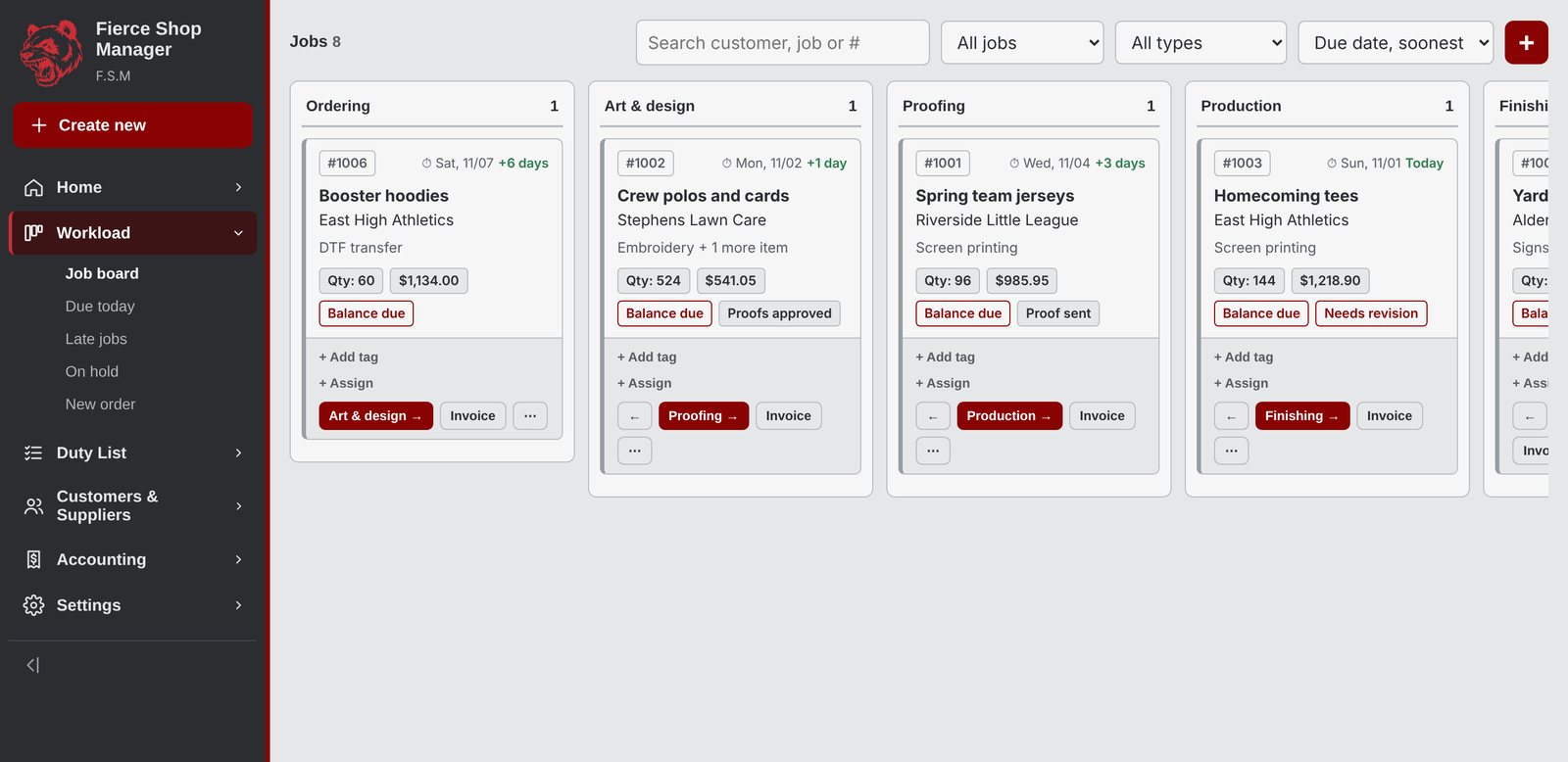
A board the whole floor can read
Ordering through to picked up, with anything stuck sitting in its own hold column. Late jobs turn red on their own, so nothing quietly slips.
- Due dates that count down, and count past zero
- Tags, assigned staff and per-job notes
- Search and filter by customer, type or status
- Moves show up on every screen within a second
Invoices that know what is owed
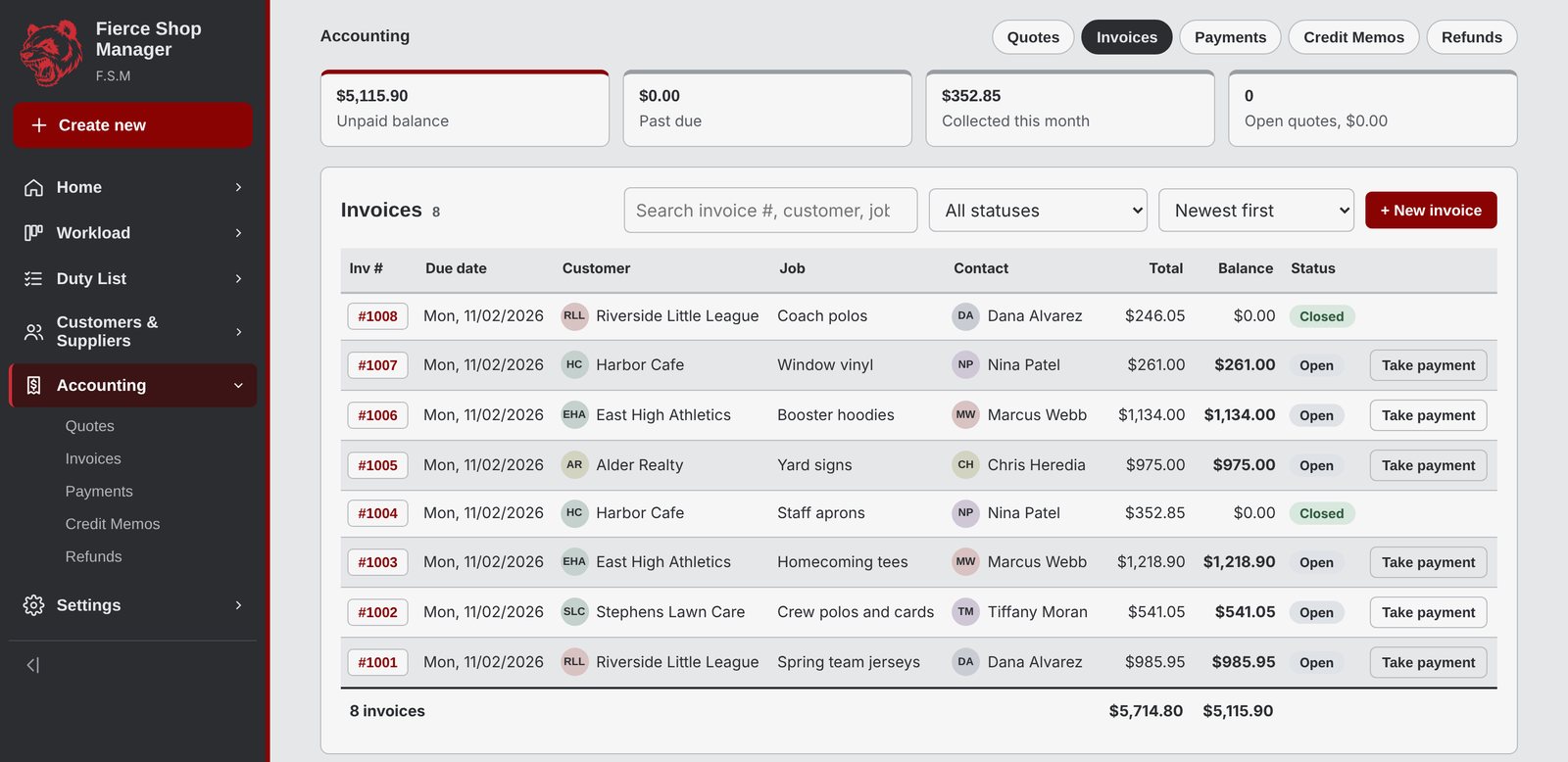
Every invoice holds as many line items as the job needs, each with its own quantity, discount and tax setting. Payments, credit memos and refunds all land back on the balance.
- Deposits and partial payments
- Quotes that convert to jobs in one click
- Past due flagged before the customer forgets
- Card fee applied only when they pay by card
The price is built in front of you
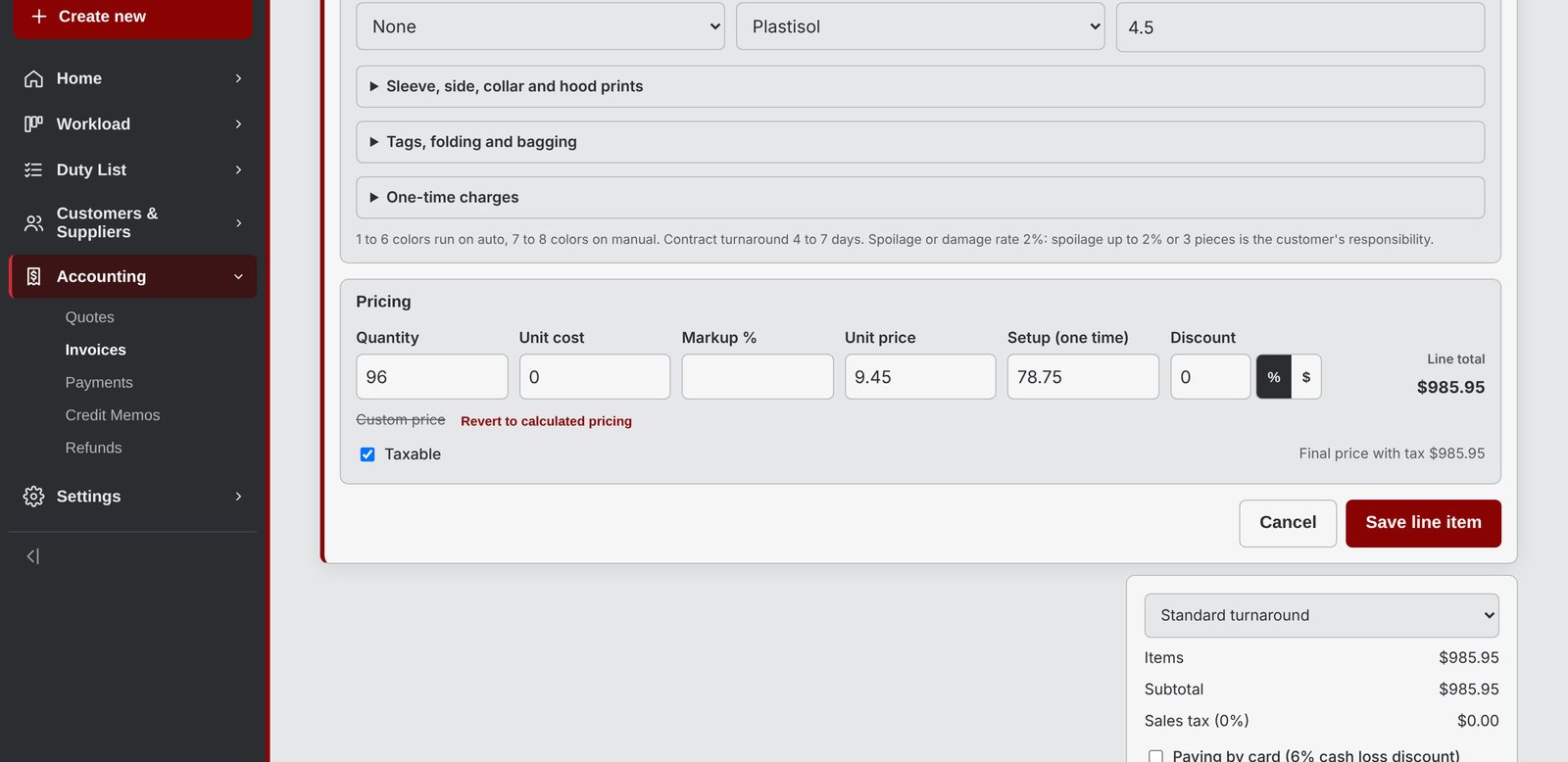
Pick the job type, set the specs, and the line prices itself from your tables. Override the number when a customer earns it, and the calculated price stays visible beside your own.
- Unit cost, markup and margin on every line
- Setup charged once, not smeared into the piece price
- Rush surcharges figured from the job total
- Discounts as a percentage or dollars off each piece
Bays and machines, booked by the hour
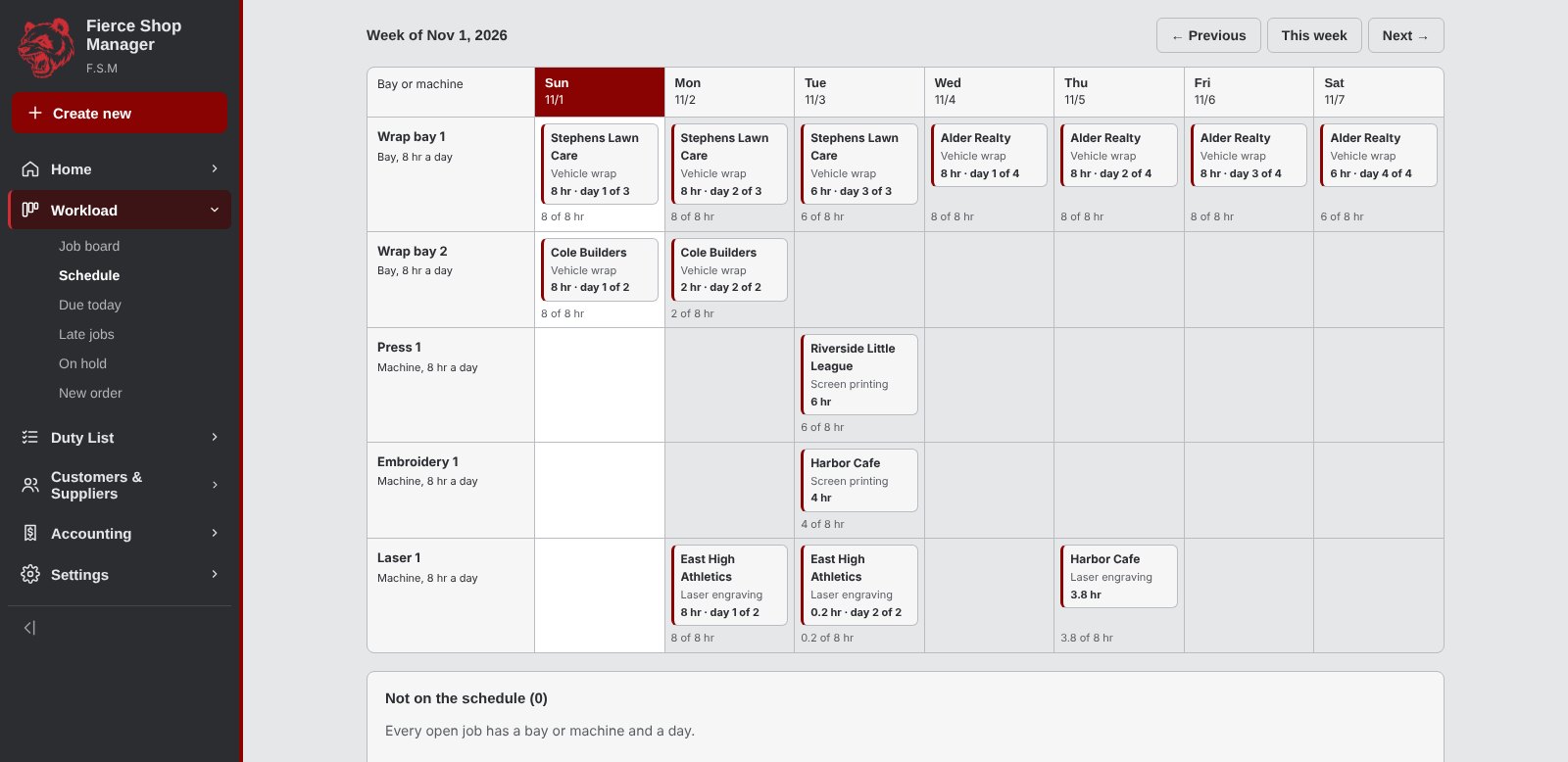
A wrap sits in a bay for three days. A laser runs one job at a time. The week view knows the difference, lays a long job across the days it really takes, and turns a day red when more hours are booked into it than it has.
- Your own list of bays, presses and machines
- Hours suggested from the job's own install or run time
- Everything still unscheduled, sitting underneath
- Click any block to open the job behind it
A portal your customers actually use
Every customer gets their own page under your name and your colors. It opens with whatever you are waiting on them for, so nobody has to go hunting through an email thread from three weeks ago.
What needs them, first thing
- Proofs waiting on a decision, right at the top
- Deposits owed before a job can start
- Open balances, totalled, with a button that goes straight there
- Quotes still sitting unapproved
- Nothing outstanding says so plainly instead of showing an empty list
Pay several invoices at once
- Tick up to ten invoices and settle them in one checkout
- Pay part of a balance when that is what the cash allows
- Each invoice gets its own payment on your side, not one lump on the wrong job
- The money goes from your customer to your own Stripe account
- Or send them to QuickBooks if that is where you take cards
Questions land on the job
- A customer messages you from the order they are asking about
- It arrives in Messages in your menu, beside that job
- Reply there and it appears on their page
- No more "which shirt order was this about?"
- The whole thread stays with the job for next time
Built for a phone
- Approve a proof, check a job, pay an invoice, all thumb-sized
- Dark mode follows whatever their phone is set to
- Your logo and your name on every screen
- One private link, nothing for them to sign up for
- Job progress updates as you move it along
Approvals
Nothing reaches the press unapproved
The proof, the answer and the date it was given all stay on the job, so there is never an argument about what was agreed.
Proofs your customer signs off
- Apparel, vehicle and flat product templates
- Driver side, rear and front views for a wrap
- Real size in inches, whether it is a left chest or a cargo panel
- Send one link, no account for them to make
- A rejection flips the job to needs revision with their note
Vehicle work, start to finish
- Year, make, model, color, plate, VIN and mileage on the job
- Condition photos stamped with the day they were taken
- Both printed on the press dossier before anyone touches the paint
- Deposits required up front, tracked against what has been paid
- Old wrap removal priced as its own hourly line
Tools for the art side
The jobs nobody wants to do by hand
Small tools that live in the same place as the job, so nothing has to be exported, measured on paper or worked out twice.
Sizes and colors on one line
- A grid of sizes with quantity, cost, markup and price
- 2XL and 3XL cost you more, and the quote already knows
- Several colors on one line, each with its own size run
- Pull a whole color in from S&S with its per-size costs
- Decoration priced on top, or let the grid set the price
Personalization without the spreadsheet
- Paste a list of names, the quantity follows it
- An optional charge per name, folded into the unit price
- The numbered list prints for whoever is at the machine
- Works on engraving, embroidery, screen print, anything
Cut lines without leaving the app
- Drop in artwork, get a print-ready PDF with a real spot-color cut path
- Set the cut line, the bleed and the clear space on sliders and watch it move
- Pick any background color, bleeding past the cut so a slipped blade never shows white
- The cut path lands on its own layer, named for whatever your RIP expects
- Twenty at a time, zipped, and nothing is ever uploaded
An assistant that drafts, not decides
- Describe a job in plain words, get a quote to look over
- It reads your pricing tables and never invents a number
- Nothing is saved until you press the button yourself
- Your customer list is never sent anywhere
- Drag it to whichever bottom corner suits you
The parts nobody enjoys
- Customers, contacts and job history
- Suppliers, stock levels and reorder flags
- Purchase orders that put stock back when received
- A duty list with daily and weekly repeats
- A press dossier showing operators the approved proof
- Invoices emailed from your own domain
How a job moves
From phone call to pickup
Quote
Add line items by job type. Prices come from your tables, not a napkin.
Approve
Send the quote and the proof. They look it over and approve it from their phone.
Pay
They pay in full or put down a deposit, online from their email or at the counter, before any work is scheduled.
Schedule
Drop it into a bay or a machine. Long jobs take the days they need.
Produce
The job moves across the board. Operators get a dossier with the approved art.
Pick up
Mark it ready and the customer gets a ready-for-pickup email. Picked-up jobs clear off the board on their own.
See it with your own numbers in it
Open a shop, put your real press rates and blank costs in, and quote the job sitting on your counter. Nothing is charged and no card is asked for.